


Checklist: preparing a CAFM data handover
A room book is not read, it is imported. Failed transfers are almost never down to the volume of data, but to small details with a large effect: a room number that occurs twice, an area that sits as text in the drawing instead of as a property of the polygon, a free-text field where the system expects a selection list.
This list goes through the points that have to be settled before the import. Most of them even belong before the survey, because they determine what is recorded on site in the first place.
19 checkpoints in 4 sections
- For whom
- Facility management, building management, CAFM project management
- When
- Before the survey, at the latest before the first import
- Effort
- 30 minutes
- Result
- Master data that can be read in on the first attempt
3.1
Target system and data model
The scope of the attributes is not a matter of taste. It follows the data model of the system the data flows into.
Target system named, or the “still open” case deliberately planned for
If the system is fixed, we align the delivery with its data model. If it is not, we deliver vendor-neutral in IFC, DWG and Excel so that the system decision remains open. Both work, but the decision belongs at the start.
Import specifications obtained from the system provider
Mandatory fields, expected data types, permissible value ranges, maximum field lengths. The system vendor has this information, and it is the most important input for preparing the data.
Capture depth defined
Three levels have become established: areas and use; additionally fit-out with floor finishes, heights, doors and windows; additionally equipment with permanently installed objects. Each level includes the previous one. When in doubt, start with the areas: a great deal can be added later as long as the point cloud is available.
Relevant guidelines checked
Where your organisation refers to the GEFMA guidelines, we align structure and handover with them.
| Guideline | What it covers |
|---|---|
| GEFMA 400 | Terms and performance characteristics of CAFM systems |
| GEFMA 410 | Interfaces for IT integration |
| GEFMA 420 | Implementation process of a CAFM system |
| GEFMA 430 | Data basis and data management, the guideline for exactly this step |
| GEFMA 444 | Certification of CAFM software products, helpful when selecting a system |
3.2
Room numbers and attributes
The room number is the key through which the system links drawing and list. Any break at this point propagates through all the data.

One valid numbering logic defined and documented
In buildings that have grown over time, several numbering schemes exist side by side: on the door sign, in the lease, in the old plan, in the cleaning schedule. You decide which one applies. We adopt it, but we cannot invent it.
Every number occurs exactly once
Across all floors and buildings of a site. Duplicate numbers are a frequent reason for aborted imports, and they are often only noticed when part of the data is already in the system.
Spelling identical in drawing and list
“1.04” in the plan and “104” in the table are two different rooms as far as the import is concerned. Define the format once, including leading zeros and separators.
Area attached to the room polygon, not only in the room stamp
As text in the drawing the area is visible but cannot be evaluated. The CAFM system needs it as a property of a closed polygon, otherwise the floor plan cannot be linked.
Attributes come from selection lists, not free text
Type of use, floor finish, equipment: where the system expects a value range, free text drops out during the import. We agree the lists before the walk-through, because they are what is recorded on site.
3.3
Areas and plant
A CAFM system needs two data sets, and both have to come together via the same key.
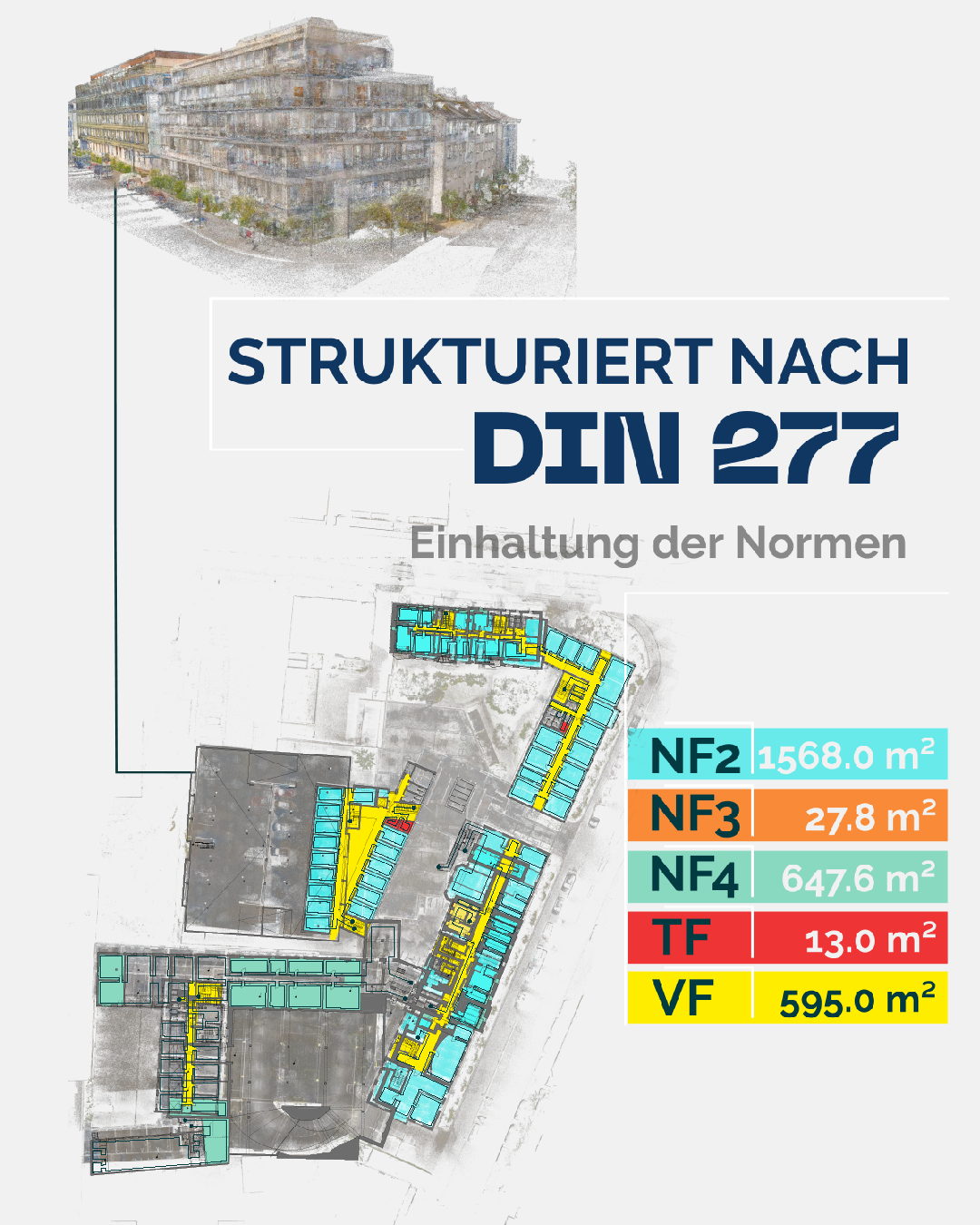
Area standard defined for each purpose
The basis is DIN 277 with BGF, KGF and NRF (gross floor area, construction area, net room area) and the division into usable, technical and circulation area. For residential space the German Living Space Ordinance (WoFlV) is added, for commercial lettable areas MF-GIF. The same area produces three different figures under the three sets of rules, and each is correct for its purpose.
Decided whether the technical plant is included
The plant is organised according to DIN 276, cost group 400: sanitary, heating, ventilation, electrical, conveying systems, building automation. In short: DIN 277 describes the areas, DIN 276 the plant. If both are needed, we capture them in one walk-through together with our partner for plant data capture.
Link between plant item and room defined
Every plant item needs its location as a room number, otherwise the fault report will not find its way later. This link is the reason why both data sets need the same numbering logic.
Plant subject to inspection flagged
Lifts, fire protection equipment, ventilation, electrical installations. For demonstrating the operator’s obligations, what matters is that they are captured completely and flagged as subject to inspection, not how finely they are described.
3.4
Before the first import
Test import carried out with one property
Send one building completely through the import process before the rest follows. Whatever comes to light would otherwise have to be corrected across the entire portfolio.
Acceptance criteria recorded in writing
How is it measured whether the delivery is complete? Common criteria are spot checks on area deviation, completeness of the mandatory fields and an error-free import into the target system.
Handling of legacy data decided
Will existing data be replaced, supplemented or kept in parallel? The trickiest case is the partial transfer, where nobody knows any more which data set is the leading one. Define which source wins in the event of a conflict.
Responsibilities for approval named
Who checks the delivery technically, who approves it, who is allowed to import into the system? Three roles that often lie with one person, but should be named.
Maintenance process after handover clarified
Who records the next conversion, and when? A data basis without an update rule will be as outdated in a few years as the documents it replaced. This is the point that is forgotten most often, and the only one on this list that nobody from outside can solve.
Archiving of the point cloud ensured
As long as it is available, missing information can be derived afterwards without anyone having to come out again. Without it, every addition means a second appointment during ongoing operation.
The sequence that has proven itself
First fix the room list and the numbering logic, then the attributes and their value ranges, then the survey, then a trial import of one property, and only after that the rollout across the whole portfolio. Each step in this sequence is cheaper than any correction afterwards.
Delivered import-ready
We deliver room book, floor plans and areas import-ready, on request with a test import into your target system. The system decision remains yours: we do not sell CAFM.
View CAFM data foundationChecklist as PDF (German)
This working aid reflects what has proven itself in our projects. It does not replace legal advice or project-specific coordination. As of: October 2026.